
Welcome back, there.
Pick up where you left off in
 Guardzy
Not you?
Track the work your business needs in one workspace. Build custom registers, link records, assign owners, and keep your team moving with approvals, checklists, and notifications.
Build custom registers, link records across teams, and keep owners, evidence, approvals, and actions connected without rebuilding another spreadsheet.
 Customer
 Inventory
 Equipment
 Deliveries
 Product
 Facility
 Site
Site Location
 Supplier
 Contractor
 Employee
 Maintenance
 Safety
 Inspection
 Quality
 Procedure
BUILD, LINK, AND ACT
Start with a blank register, choose the fields you need, and connect records, owners, approvals, and follow-up actions as your work grows.

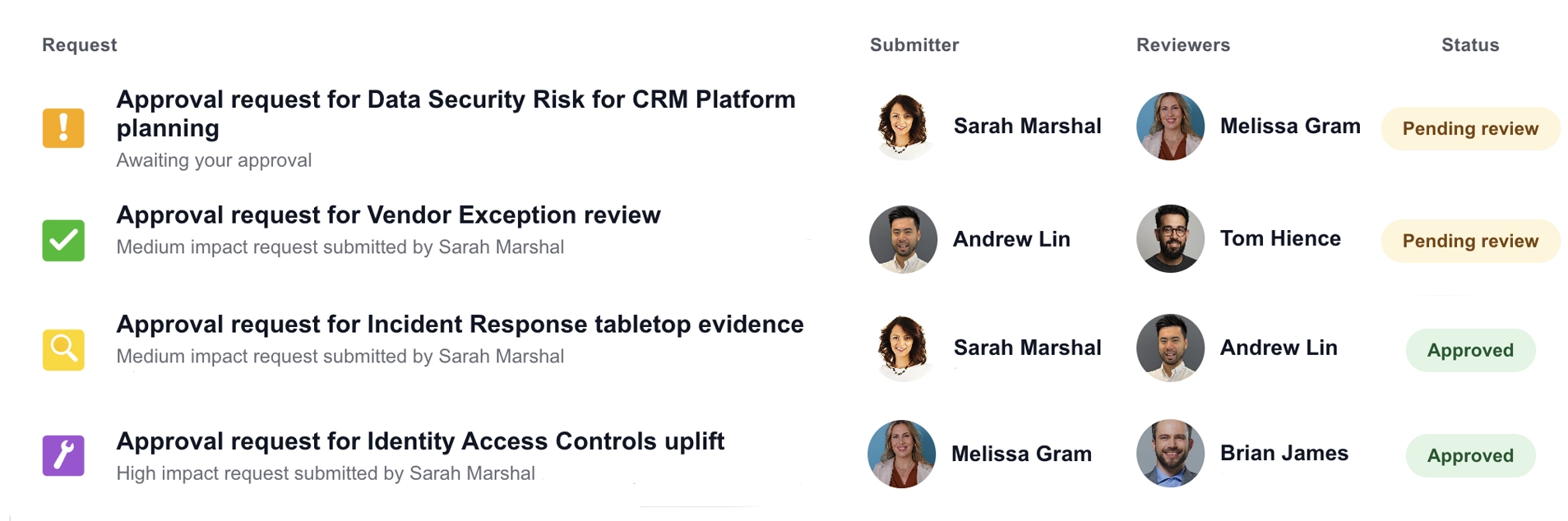
Create approval items for routine work and link them to the register record they affect, then let the platform track sign-off and review history so your team stops chasing approvals in chat, email, or spreadsheets.
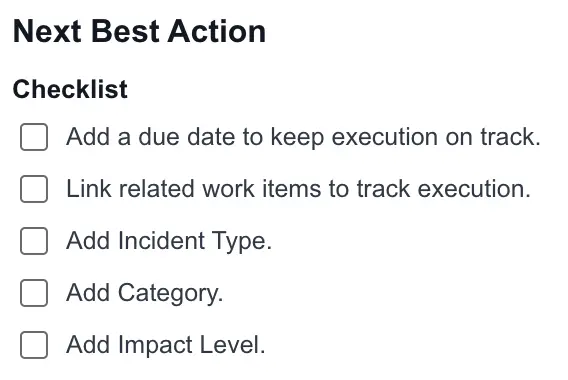
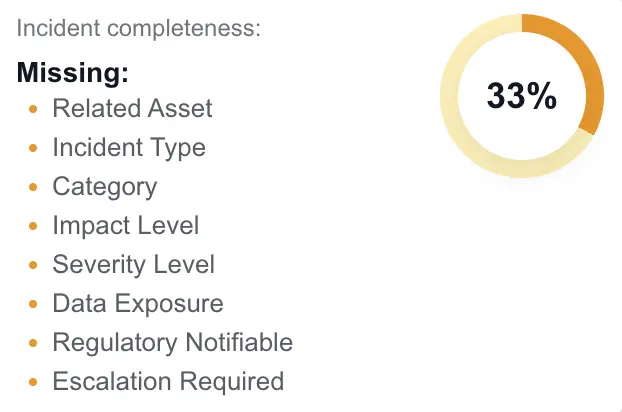
Assign owners, set due dates, and use checklists to keep the next action clear.

Link related records across your registers and keep the information your team needs together.
CUSTOMER DATA PROTECTION
Customer files are kept in private, versioned storage with server-side encryption. Managed traffic controls help filter malicious requests, database storage is encrypted with automated backups, and Guardzy services run inside restricted network boundaries with access limited to authorised services.

Five steps to building connected registers in Guardzy, from setup to team follow-through.
Customer
Supplier
 Asset
Asset
 Project
 Risk
Risk
 Policy
Employee
Audit
Policy
Employee
Audit
 Contract
Equipment
Incident
Contract
Equipment
Incident
 Task
Task
Build registers around the way your organisation works, with custom fields, icons, owners, linked records, and evidence.


Bring teammates into Guardzy, organise them into teams, and assign clear owners and due dates to every register item.
Task
Review supplier onboarding evidence
TSK-008 Contract
Renew Evergreen Logistics agreement
CON-008
Contract
Renew Evergreen Logistics agreement
CON-008 Equipment
Schedule warehouse equipment inspection
EQP-015
Equipment
Schedule warehouse equipment inspection
EQP-015 Project
CRM Platform rollout
PRJ-007
Project
CRM Platform rollout
PRJ-007 Risk
Ransomware risk assessment
RSK-003
Risk
Ransomware risk assessment
RSK-003 Policy
Access Control Policy review
POL-012
Customer
Northstar Systems onboarding
CUS-001
Policy
Access Control Policy review
POL-012
Customer
Northstar Systems onboarding
CUS-001 Asset
Fleet Vehicle 24 registration
AST-024
Audit
Quarterly finance access audit
AUD-004
Asset
Fleet Vehicle 24 registration
AST-024
Audit
Quarterly finance access audit
AUD-004
See assigned work, track progress in your registers, and use the team calendar to keep dates in view.

Keep owners aware of due dates, checklist items, and approvals that need attention.
Review supplier onboarding evidence
Supplier
Sarah ChenContributor
TSK-001
In Progress
28 Jul
 Set up approval workflow
Approval
Mark TaylorContributor
TSK-002
Done
31 Jul
Set up weekly progress tracking
Project
Fiona BennettContributor
TSK-003
Open
2 Aug
Set up approval workflow
Approval
Mark TaylorContributor
TSK-002
Done
31 Jul
Set up weekly progress tracking
Project
Fiona BennettContributor
TSK-003
Open
2 Aug
 Review supplier details
Supplier
John TseContributor
TSK-004
Not Started
3 Aug
Review supplier details
Supplier
John TseContributor
TSK-004
Not Started
3 Aug
 Check upcoming due dates
Action
Maya ChenContributor
TSK-005
In Progress
4 Aug
Review Driver Safety Policy
Policy
Marcus ReedContributor
TSK-006
Completed
5 Aug
Approve supplier register launchSupplier
Marcus Reed
Sarah Chen
APR-001
Pending
31 Jul
Driver Safety Policy reviewPolicy
Sarah Chen
Marcus Reed
APR-002
Approved
1 Aug
Quarterly audit sign-offAudit
Mark Taylor
Fiona Bennett
APR-003
Pending
2 Aug
Vendor onboarding approvalVendor
Maya Chen
John Tse
APR-004
Changes
3 Aug
Customer data access reviewApproval
John Tse
Sarah Chen
APR-005
Approved
4 Aug
Fleet vehicle replacementAsset
Fiona Bennett
Mark Taylor
APR-006
Pending
5 Aug
Check upcoming due dates
Action
Maya ChenContributor
TSK-005
In Progress
4 Aug
Review Driver Safety Policy
Policy
Marcus ReedContributor
TSK-006
Completed
5 Aug
Approve supplier register launchSupplier
Marcus Reed
Sarah Chen
APR-001
Pending
31 Jul
Driver Safety Policy reviewPolicy
Sarah Chen
Marcus Reed
APR-002
Approved
1 Aug
Quarterly audit sign-offAudit
Mark Taylor
Fiona Bennett
APR-003
Pending
2 Aug
Vendor onboarding approvalVendor
Maya Chen
John Tse
APR-004
Changes
3 Aug
Customer data access reviewApproval
John Tse
Sarah Chen
APR-005
Approved
4 Aug
Fleet vehicle replacementAsset
Fiona Bennett
Mark Taylor
APR-006
Pending
5 Aug
Turn register items into approval requests, then create and assign checklist items to team members with owners, due dates, evidence, and completion tracked in Guardzy.